
Use Flutter when you need one team to ship a polished app on Android and iOS, and possibly web and desktop, without paying for separate builds. Why use Flutter for app development comes down to eight reasons: a single codebase, hot reload, a flexible widget-based interface, near-native speed, faster time to market, the approachable Dart language, Google's backing, and built-in testing and accessibility support. Startups building an MVP and brands with a custom design get the most from it. So do teams with Java, Kotlin or C# skills. Teams that need deep hardware access or very small installs should read the limits near the end.
Picking a framework is one of the costliest early decisions in a mobile project. Online opinions swing between hype and hate, and most of them skip the trade-offs that decide whether Flutter suits your product. You need to know what each advantage means in practice, who benefits from it, and where the catch is.
This article takes each reason in turn, with a worked cost example and an honest list of drawbacks. At Eagle Technologies we build apps in Flutter, React Native and native iOS and Android, so the advice below comes from choosing between them, not from selling one.
What Flutter app development means
Flutter app development means building apps with Google's open-source Flutter SDK and the Dart language, so that one project produces apps for several platforms. It is not a thin wrapper around a website. The toolkit draws the interface itself and compiles to native code.
Flutter in plain terms
Flutter is a complete software development kit, not a single library. It has three layers. A Dart framework holds the widgets and libraries you code against. A C/C++ engine handles graphics, text layout and input. A small embedder per operating system lets the app run on iOS, Android, Windows, macOS or Linux.
Google released the first stable version in December 2018. Because Flutter paints every pixel itself instead of wrapping each platform's native controls, a screen looks the same on every device you ship to.
Flutter is a toolkit that draws its own interface, which is why one project can behave the same on every platform.
Is Flutter used for real app development?
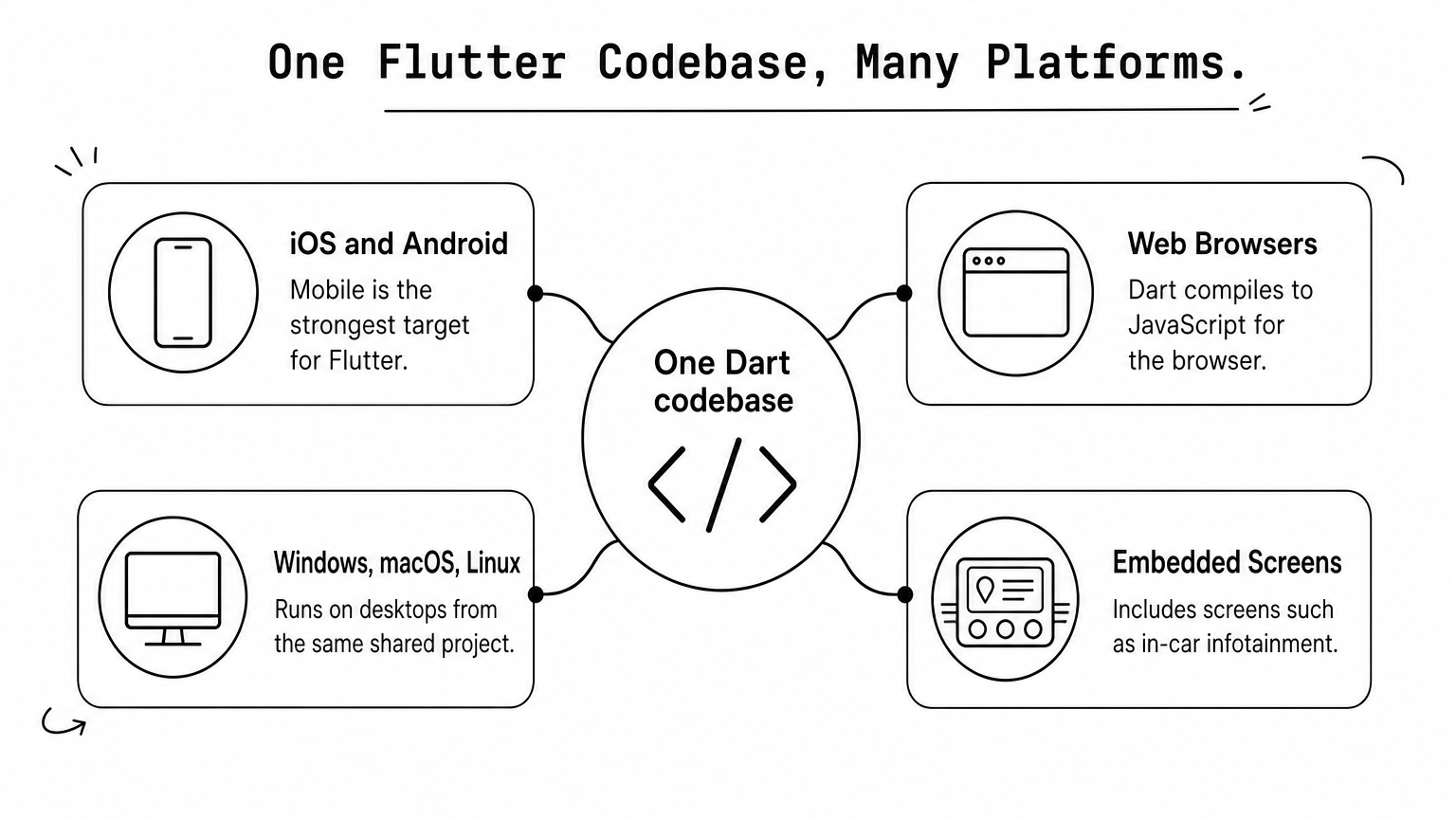
Yes. Flutter runs production apps at large companies, including Google Pay, Google Ads, Alibaba, eBay Motors, the My BMW app and the Brazilian digital bank Nubank. Beyond phones, one codebase can target:
- iOS and Android
- Web browsers
- Windows, macOS and Linux desktops
- Embedded screens, such as in-car infotainment
Mobile is the strongest target. Web and desktop work well for many products, but check the specific features you need before committing to them.
1. One codebase for every platform
A single Flutter codebase builds iOS and Android apps, and can also produce web and desktop versions. That is the core reason most teams pick it. You write the interface and business logic once, in Dart, instead of keeping two or more parallel projects in sync.
How it works
Dart compiles ahead of time to native machine code for mobile and desktop, and to JavaScript for the browser. The screens, navigation, state management, networking and data models all live in one shared project. When a bug appears in the checkout flow, you fix it once and release it to every platform together.
Device-specific features, such as the camera, Bluetooth or push notifications, are reached through plugins or platform channels. Most common needs already have a maintained package. For rare ones, a developer writes a small piece of Kotlin or Swift and calls it from Dart.
One codebase means one bug fix, one feature build and one release plan instead of two or three.
Who benefits most
Product owners who need feature parity on both mobile platforms gain the most, because the two apps can no longer drift apart. Small teams gain too, since a single group of developers can cover everything.
Teams should still be realistic about reach. Mobile is Flutter's most mature target, so treat web and desktop as a bonus to verify against your requirements.
2. Hot reload speeds up every change
Hot reload lets you edit code and see the result in the running app within about a second, with your place in the app preserved. It is the feature developers mention first when they explain why they like Flutter.
How it works
During development Flutter uses a just-in-time compiler. When you save, the tool injects the changed code into the running Dart virtual machine and rebuilds the widget tree. The app's state survives, so the screen you were testing stays open.
If a change affects the app's starting state, hot restart reloads everything from scratch. It is slower but still quicker than a full rebuild. Release builds use ahead-of-time compilation instead, which is why the shipped app starts fast.
Imagine you are fixing a layout bug on a screen five taps deep. Without hot reload, each tweak means rebuilding and tapping back to that screen. With it, you adjust the padding and watch it change in place.
Who benefits most
Teams that iterate with designers or stakeholders benefit most. You can adjust a colour or spacing live in a review meeting. Newer developers also learn faster, because feedback is immediate.
Flutter is not the only framework with this idea. React Native has Fast Refresh. The difference is that hot reload is built into Flutter's architecture, so it needs no plugin and works reliably with state.
Hot reload turns UI work from a build-and-wait cycle into a live conversation with the app.
3. A flexible, consistent widget-based UI
In Flutter, everything on screen is a widget, from a button to a padding value, and you build interfaces by nesting them. This gives you complete control over how the app looks, and the result is identical across devices.

How it works
Flutter ships with a large library of ready-made widgets. They include Material Design widgets for Android-style interfaces and Cupertino widgets that mimic iOS. You can combine them, restyle them, or build your own from the same low-level pieces the Flutter team uses.
Because the engine draws everything, your UI does not depend on the operating system's native controls. That means the design on a three-year-old phone matches the design on a new one. It also means animations, custom charts and branded components are not constrained by what the platform offers.
Who benefits most
Brands with a strong visual identity get the most value. If your designer delivers a custom component that the iOS and Android defaults cannot produce, Flutter lets you build it once.
There is a trade-off. Because Flutter does not use native controls, new operating system visuals do not appear automatically. The team has to update the widgets. If you want your app to feel strictly platform-native, plan for that extra effort or consider true native development.
If your design is custom, Flutter lets you build it once instead of twice.
4. Near-native performance
Flutter apps compile to native machine code and render through Flutter's own engine, which is why they typically feel smooth and close to native apps. The framework targets 60 frames per second, and 120 on screens that support it.

How it works
Two design choices matter. First, release builds are compiled ahead of time to native ARM code, so there is no interpreter at runtime. Second, Flutter has no JavaScript bridge between your code and the native layer. Frameworks that use a bridge pass messages across it, which adds overhead and complicates debugging.
The rendering engine also matters. Flutter's newer renderer, Impeller, is designed to avoid the stutter that can appear the first time an animation runs. Independent benchmarks vary by device and test, and some show Flutter using more memory than alternatives. The consistent finding is that Flutter lands close to native for normal app workloads.
Who benefits most
Apps with heavy animation, data-dense dashboards or scrolling lists benefit most. Fintech, e-commerce and media apps are typical examples.
Flutter is not the best choice for everything graphical. Heavy 3D work and augmented reality are usually better served by native tools, because they need direct access to platform graphics APIs. We cover those cases in the limits section below.
Compiling to native code with no bridge is what lets Flutter feel fast without being native.
5. Faster time to market and lower cost
Flutter shortens delivery and reduces cost because most of the work is shared across platforms. The savings are real but not unlimited, because some work remains platform-specific.
How it works
The saving comes from shared UI, shared logic and shared testing. Here is a worked example using an assumption, not a benchmark. Suppose a feature takes 100 hours to build natively on each platform. In Flutter, assume 70% of that work is shared and 30% is platform-specific.
| Approach | Android | iOS | Shared | Total |
|---|---|---|---|---|
| Two native builds | 100 h | 100 h | 0 h | 200 h |
| Flutter | 30 h | 30 h | 70 h | 130 h |
That is 70 hours saved, or 35%. Your actual share will vary with how much your app depends on device features. Flutter itself is free and open source, so there are no license fees. You also run one QA process for the shared interface instead of two.
Who benefits most
Startups validating an idea benefit first, because an MVP reaches both app stores faster and for less money. Companies with long feature backlogs benefit as well, since every release ships to all platforms together.
Be careful with extreme claims. Flutter does not make an app cheap if the design is complex or the integrations are unusual. It removes duplication, which is where most of the savings come from.
Flutter saves money by removing duplicated work, not by making the hard parts easy.
6. Dart is easy to pick up
Dart is a modern, object-oriented language with a syntax that feels familiar if you know Java, Kotlin, C# or Swift. For most mobile developers, learning it is a matter of weeks, not months.
How it works
Dart has strong typing, null safety, classes and async/await for asynchronous code. It supports both ahead-of-time and just-in-time compilation, which is what makes hot reload and fast release builds possible. Layout and logic live in the same language, so there are no separate XML layout files, as in classic Android development.
Official resources help. The Dart language tour and DartPad, a browser-based playground, let you experiment before installing anything. A developer who already writes Kotlin can usually read Dart code on day one.
Who benefits most
Android and Java teams adapt fastest, and so do .NET developers moving into mobile. If your team already works in a typed object-oriented language, the learning curve is gentle.
The honest downside is the hiring pool. Dart is less widespread than JavaScript. In the 2024 Stack Overflow survey, roughly 6% of respondents reported using it. Developers who know Flutter are easier to find than they used to be, but the pool is still smaller than for JavaScript-based frameworks. Plan for onboarding time or hire through a partner.
Dart is easy to learn, but plan your hiring around a smaller talent pool.
7. Google's backing, documentation and ecosystem
Flutter has strong documentation, an active package ecosystem and Google behind it. Google builds its own products with Flutter, so the toolkit has a major user with an interest in keeping it maintained.
How it works
The official docs, video tutorials and Codelabs walk you from installation to a first working app. Packages live on pub.dev, which holds tens of thousands of libraries for state management, networking, maps, payments, animations and Firebase. Community support is spread across Stack Overflow, Reddit and Discord, so common problems already have answers.
Flutter's built-in tooling adds to this. DevTools lets you inspect layouts, profile performance and debug. Release builds for the app stores and CI/CD automation are well documented.
Who benefits most
Teams that need long-term maintainability benefit from a framework that is actively developed and widely used. First-time cross-platform teams benefit from the learning material.
Backing is a signal, not a guarantee. The ecosystem is smaller than that of the JavaScript world, and a niche third-party SDK may lack a Flutter package. In that case a developer writes a native bridge. Check your must-have integrations before you commit.
Google's backing and good documentation lower the risk of adopting Flutter, though they do not remove it.
8. Built-in testing, accessibility and localization
Flutter includes testing tools, accessibility support and internationalization from the start, so quality work does not depend on extra libraries. This matters most for apps that will be maintained for years.
How it works
Flutter supports three kinds of automated test: unit tests for logic, widget tests for individual interface components, and integration tests for complete user flows. Because the UI is shared, a widget test written once covers both platforms.
For accessibility, Flutter supports screen readers, large font settings and sufficient colour contrast. You still need to test your own designs, for example by setting the largest system font and checking that the layout holds. For localization, the Dart intl package supports many languages, plus dates, currencies and right-to-left layouts.
Who benefits most
Apps that serve several languages or regions benefit directly, as do enterprise and regulated products that must meet accessibility expectations. Teams with CI pipelines can run the same tests on every commit.
Test accessibility on real devices with TalkBack on Android and VoiceOver on iOS. The framework gives you the hooks, but it cannot judge whether your labels make sense.
Built-in testing and accessibility tools make quality a habit of the project instead of an afterthought.
When Flutter is not the right choice
Flutter is a poor fit when your app depends on deep hardware access, very small installs or a team already invested in another stack. Knowing these limits is what separates a good decision from a trend-driven one.
Drawbacks to plan for
- App size. A bare Flutter app is several megabytes, while a minimal native app can be under 1 MB. This matters for instant apps and markets with limited storage or data.
- Widget nesting. Deep widget trees can become hard to read. Split large screens into smaller widgets and plan the structure early.
- Library gaps. Some niche SDKs have no maintained Flutter package, which means custom native code.
- Platform lag. New operating system features may arrive in native tools first, and Flutter support follows.
- Smaller Dart talent pool. Hiring takes more care than for JavaScript.
Which approach fits which project
| Your situation | Better fit |
|---|---|
| Custom, animation-rich UI on iOS and Android | Flutter |
| MVP on a tight budget and timeline | Flutter |
| Team already strong in React and JavaScript | React Native |
| AR/VR or heavy use of device sensors | Native |
| Tiny instant app or rare native libraries | Native |
So is Flutter good for app development? For most business apps with a custom interface, yes. If your project sits in the native rows of the table, hire native specialists instead. Eagle Technologies builds in all three approaches, and also places dedicated Android and iOS developers from its Jaipur delivery centre.
Choose Flutter for what it is best at, and choose native when your app lives close to the hardware.
Make the choice with your own app in mind
Flutter earns its place for a clear set of reasons: one codebase, fast iteration, a flexible UI, near-native speed, lower delivery cost, an easy language, strong backing and built-in quality tooling. Its weak spots are app size, niche libraries and hardware-heavy products. If your app is a business product with a custom design on iOS and Android, Flutter is usually a sound bet.
If you are still weighing options, bring your feature list, your team's skills and your deadline. Eagle Technologies can review them with you and recommend Flutter, React Native or native without a bias. You can start by talking to Eagle Technologies about your app.